
Santol Edge Team
AI Research & Engineering at Santol Edge
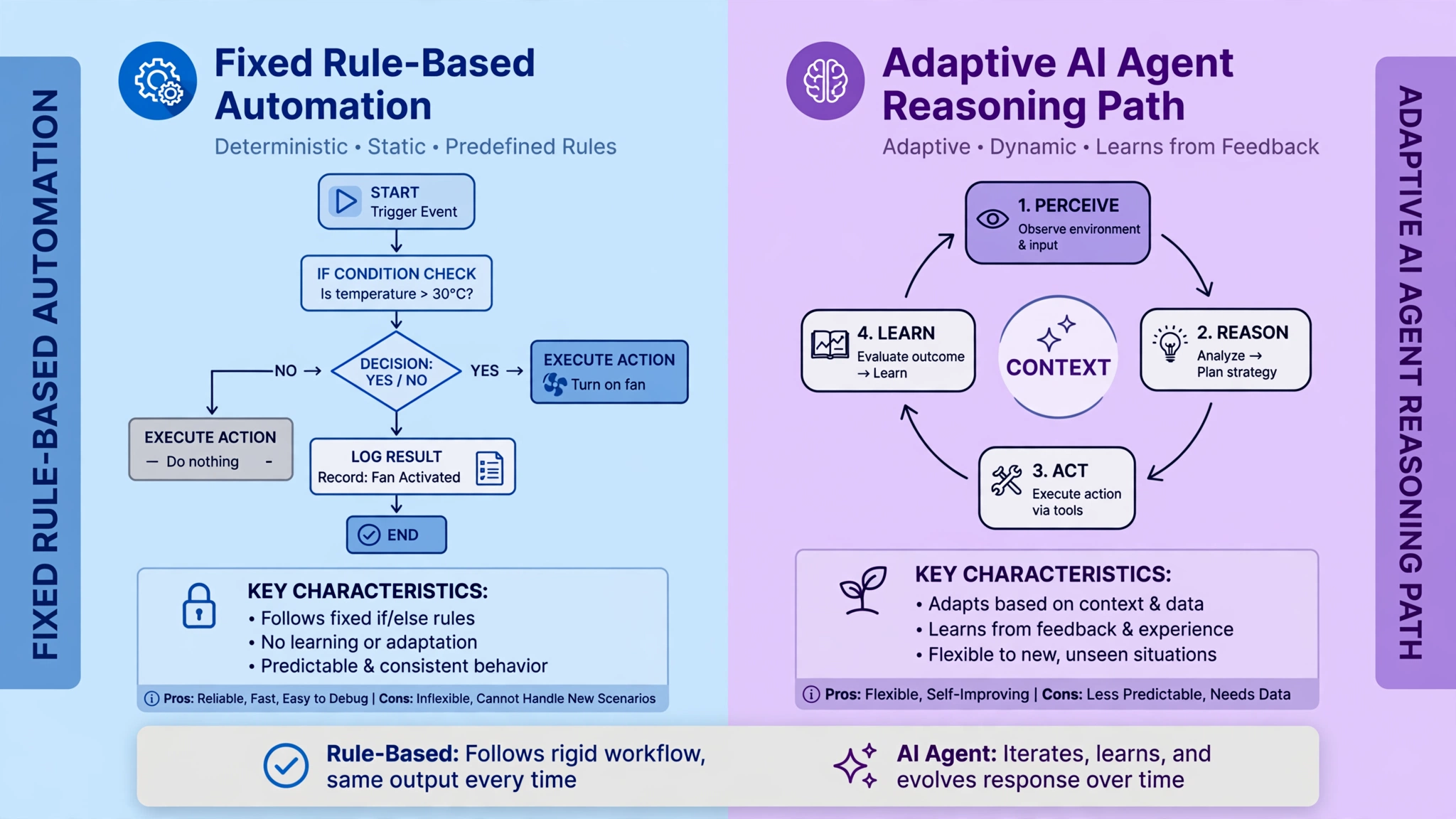

“AI Agents vs Automation Workflows: Which One Does Your Business Need?”
AI Agents vs Automation Workflows: Which One Does Your Business Need?
"Should I get an AI agent, or just automate it?" — it is one of the most common questions businesses ask when exploring AI, and the confusion is understandable: every software vendor now calls their product an "agent." Here is the one-line distinction that cuts through all of it: with an automation workflow, you decide every step in advance and the software executes your script; with an AI agent, the software decides the next step itself while it works. That's the entire debate, and once you see it, choosing correctly becomes straightforward. This guide explains both in plain language, compares them honestly — including where agents are the wrong choice — and gives you a decision framework you can use today.
What Is an Automation Workflow? (Plain Language)
An automation workflow is a recipe you write once, and the computer follows it forever. "When X happens, do Y." If a new lead fills out your contact form, send them a welcome email, add them to your CRM, and notify your sales rep. Those steps never change order. They never improvise. They run identically every single time.
The tools behind these are familiar: Zapier, Make, HubSpot workflows, built-in automations inside your CRM or email platform. A trigger fires (form submitted, payment received, deal stage changed), a series of if/then steps runs, and the result lands where you told it to.
Workflows are at their best when the input is structured and the correct action is obvious. A new row appears in a spreadsheet → a task is created. An appointment is booked → a calendar invite and a reminder go out. There's no judgment call in between, and that's exactly why they're so reliable: nothing about the run depends on interpretation.
The limitation is equally simple: a workflow only handles what its author anticipated. If a lead replies to your automated email with a long, complicated message — a pricing question mixed with a complaint and a request to change their appointment — the workflow has no idea what to do with it. It was never taught to read between the lines. In the past, the answer was to add more and more branches and exceptions until the workflow became a fragile maze. Today, there's a better answer for that kind of input — which is where agents come in.
What Is an AI Agent? (Plain Language)
An AI agent is software you give a goal, not a script. Instead of "do step 1, then step 2, then step 3," you say something like: "Research this new lead, figure out if they're a good fit, and draft a personalized follow-up." The agent then reasons its way through: it looks up the company, checks your CRM for history, decides what information matters, picks which tools to use, and adapts when something unexpected turns up.
Under the hood, this is usually a large language model running in a loop — observe, reason, act, check the result, repeat — with access to tools: your CRM, your calendar, the web, your knowledge base, your email. Each cycle, the model decides the next step itself. Nobody wrote "if the lead's website mentions pricing, then do X." The agent figures that out in the moment.
That freedom is the whole point — and the whole risk. An agent can handle a messy inbox thread, a vague customer complaint, or a research task where you genuinely don't know the steps in advance. But because it chooses its own path, two runs are never perfectly identical, it costs more per run (every reasoning step uses model calls), and auditing exactly why it did something takes real work.
The Real Difference: Who Chooses the Next Step?
Here's the sharpest framing for it, and it's worth repeating: an agent decides what to do; an automation does what you described. The question is always: at execution time, who picks the next step — you (in advance) or the software (in the moment)?
This is also the architectural distinction Anthropic has described in its guidance on building with models: some systems are workflows, where the path is predefined — steps orchestrated through fixed code — and some are agents, where the model dynamically directs its own process, choosing tools and actions as it goes. Both are legitimate. They're different tools for different shapes of work.
Why does this matter for a business owner? Because the wrong choice has real costs:
Buy an agent for a deterministic task and you've paid a premium for judgment you never needed. Every run costs more, behaves slightly differently, and is harder to audit — for a job a fixed rule would do perfectly, forever, for almost nothing.
Build a workflow for an ambiguous task and you get a brittle system that fails on the first surprise. The exceptions pile up, someone has to babysit it, and eventually a human is doing the work anyway — which defeats the purpose.
Google's own guidance on agentic systems makes the same point from the other side: deterministic problems are often cheaper and more reliable as conventional workflows. Don't use an AI agent simply because you can. If an if/then rule solves the problem reliably, use the rule.
AI Agents vs Automation Workflows: Side-by-Side Comparison
DimensionAutomation WorkflowAI AgentDecision-makingYou define every step and branch in advance. The software never invents a step.The model chooses each step at run time based on the goal and what it observes.Handling surprisesFails or falls back to a default on anything not anticipated. Exceptions queue up for a human.Adapts mid-process: re-plans, tries another tool, asks for clarification, escalates.Data it handlesStructured input: form fields, statuses, amounts, dates. Needs clean, predictable fields.Unstructured input: emails, PDFs, chat messages, voice notes, web pages. Interprets messy language.Failure modesPredictable: it fails the same way every time, which makes it easy to debug and fix.Variable: it can fail differently on different runs — wrong tool choice, a hallucinated fact, a skipped step. Harder to reproduce and diagnose.Cost per runNear zero once built. Rule execution is cheap.Meaningfully higher. Every reasoning cycle is a model call; long multi-step tasks add up.AuditabilityTrivially auditable: the log shows exactly which rule fired and why.Auditable with effort: you need run traces showing what the model saw, decided, and called. Possible, but it's a system you build deliberately.SpeedFast — direct execution, no thinking between steps.Slower — it literally pauses to "think" between actions.Setup effortLow to medium. Most tools are no-code or low-code.Medium to high. Defining goals, tools, guardrails, and approval gates takes real design.
None of these are absolute weaknesses — they're tradeoffs. The right question is never "which is better?" but "which tradeoff does this task need?"
Use Automation Workflows When…
Choose the workflow when the task is structured, repeatable, and the correct response is obvious. Concrete examples:
Appointment reminders. Booking confirmed → calendar invite + SMS reminder 24 hours before + "running late?" message on the day. Same steps every time. A rule is perfect here. (Our fixed-scope Appointment Booking Automation package covers exactly this kind of setup.)
Lead notifications and routing. New form submission → add to CRM → assign to the right rep based on territory or deal size → Slack/email alert. Structured input, fixed logic, zero ambiguity.
Data sync between systems. New invoice in accounting → record in reporting sheet → notify finance. Moving clean data from A to B is the textbook workflow job.
Follow-up sequences. Day 1: welcome email. Day 3: check-in. Day 7: last call. Timed, identical, measurable. For a full playbook on designing these, see our AI lead follow-up automation playbook.
Status updates and internal alerts. Deal moved to "Closed Won" → create onboarding task → notify the team → send the client a welcome pack.
The pattern: if you can write down the exact steps on a whiteboard, including what happens in every branch, it's a workflow. Building it as an agent would just add cost, latency, and unpredictability to something a rule does flawlessly.
Use AI Agents When…
Choose the agent when the task involves judgment, interpretation, or steps you can't fully specify in advance. Concrete examples:
Lead research and qualification. A prospect submits a form with a company name. An agent looks up the company, checks its size and industry, searches your CRM for prior contact, scores the fit, and drafts a personalized first message — steps that change depending on what it finds. A fixed workflow can't research; it can only copy fields.
Support triage on messy input. A customer writes a long email that's part complaint, part feature request, part billing question. An agent reads it, classifies the issues, pulls the order history, drafts a response covering all three, and escalates the billing part to a human. A rule-based router would have misclassified it or bounced it around.
Operations exception handling. Most orders flow through your standard workflow. The 5% that don't — mismatched addresses, partial payments, supplier delays — land in a human's lap. An agent can investigate those exceptions: check the records, identify what went wrong, propose a fix, and ask for approval before acting.
Multi-step research tasks. "Find ten podcasts our ideal customers listen to and draft outreach for each." You can't predefine the steps because the steps depend on what's discovered. That's agentic work.
The sweet spot, as several practitioners put it: unstructured input + multiple possible actions + tools to act with + a measurable objective. When a task has all four, an agent earns its keep.
The Hybrid Approach: A Workflow With an Agent Step Inside
Here's the pattern most mature businesses actually end up with: a fixed workflow that calls an agent for exactly one step — the step that needs judgment.
Examples:
Lead intake workflow: a workflow captures the form, validates fields, and writes to the CRM (fixed steps). But before the lead is assigned, it calls an agent step to research the company and write a two-sentence context summary for the sales rep. Plumbing stays deterministic; the one fuzzy part gets real intelligence.
Support workflow: a workflow routes every ticket (fixed). Tickets flagged as "complex or emotional" get routed to an agent step that drafts a response for a human to approve before sending. The agent never sends anything on its own.
Review/response workflow: a workflow pulls all new reviews daily (fixed). An agent step drafts reply suggestions; a human approves and posts. Consistent coverage, human quality control.
This pattern gives you the best of both worlds: the reliability, low cost, and auditability of workflows, with AI judgment applied surgically where it matters. Notice the common thread: the agent's outputs feed into a human approval gate before anything irreversible happens. That's not paranoia — it's the design that makes agents safe to run in a real business.
Your Decision Checklist: 5 Questions
Run any task through these five questions before you build:
Can I write down every step in advance, including all the branches? Yes → workflow. No → keep going.
Is the input structured (fields, statuses, amounts) or unstructured (emails, documents, conversations)? Structured → workflow. Unstructured → agent candidate.
What happens if it gets something wrong? If a mistake is expensive, irreversible, or customer-facing (refunds, legal, public messages), either pick a workflow or put a human approval gate in front of the agent. If mistakes are cheap and reversible, an agent is safer to try.
Does it need to run the same way every time for compliance or audit? Regulated steps (financial records, data handling) favor workflows. Agents need extra tracing work to reach the same auditability.
Is the per-run cost justified? An agent costs more per run. Multiply by volume: 20 complex runs a day might be fine; 20,000 simple runs a day as an agent is a budget fire. High-volume, simple work is workflow territory.
If you're still unsure after these five, start with the workflow and add an agent step only for the part where the workflow keeps breaking on exceptions. That's the cheapest way to discover what you actually needed.
For a deeper look at the cost side of this math, our AI automation ROI guide walks through how to calculate payback on automation projects, and AI automation for small business covers where to start if you're automating for the first time.
Mistakes Buyers Make
Mistake 1: "Let's make everything an agent." This is the most expensive mistake right now. Agents are exciting, so teams reach for them for deterministic work — sending reminders, syncing data, filing records. The result: higher per-run costs, slower execution, and occasional weird behavior in a process that a simple rule would have handled perfectly. Rule of thumb: if a flowchart fully describes the task, build the flowchart, not the agent.
Mistake 2: "We'll just add more branches to the workflow." The mirror-image mistake. Teams keep bolting exceptions onto a rule-based system for work that's genuinely ambiguous — classifying support emails, qualifying messy leads, reading documents. After the twentieth branch, the workflow is unmaintainable and still fails on the twenty-first surprise. That's the signal to promote that step to an agent (inside a workflow, with a human gate).
Mistake 3: Skipping the approval gate. Letting an agent take irreversible actions unsupervised — sending customer messages, issuing refunds, changing records — because the demo looked smooth. Demos don't show the one-in-fifty run where the agent confidently does the wrong thing. Keep a human approval in front of anything you can't easily undo, at least until you've watched the agent handle real volume.
Mistake 4: Buying the label, not the architecture. Vendors call everything an "agent" now — including plain if/then workflows with a chatbot skin. Ask the uncomfortable question: who chooses the next step at execution time — a script I could read, or a model deciding in the moment? If it's a script, you're buying a workflow. Price and evaluate it as one.
Mistake 5: Automating chaos. Neither approach fixes a broken process — they just execute it faster. If your lead follow-up is inconsistent because nobody owns it, an agent will be inconsistently autonomous. Map the process on paper first, fix the ownership gaps, then automate the stable parts and agent-ify the judgment parts. Our CRM automation guide: what to automate first is a good starting point for getting the underlying system clean before adding AI on top.
What Does This Cost to Build?
Honest answer: it depends on scope, but the two paths price very differently. Simple workflow automations (lead routing, reminders, follow-up sequences, CRM sync) are typically fixed-scope builds — at Santol Edge, our automation packages are fixed and published: an AI Automation Audit is $149, Lead Qualification Automation $699, Appointment Booking Automation $799, and CRM Automation Setup $999. Agentic builds cost more because there's more design work: defining the goal, selecting and securing the tools, building guardrails and approval gates, and testing against real messy input. The audit is usually the right first step — it maps which of your tasks are workflow-shaped and which are agent-shaped before you spend on either.
FAQs
What's the simplest way to explain AI agents vs automation workflows?
An automation workflow follows a script you wrote: when X happens, do Y, every time. An AI agent pursues a goal and decides each step itself as it works. The one-line test: at execution time, who chooses the next step — you (in advance) or the software (in the moment)?
Are AI agents better than automation workflows?
Neither is better — they solve different problems. Workflows win on structured, repeatable tasks: cheaper, faster, perfectly consistent, easy to audit. Agents win on ambiguous, judgment-heavy tasks: interpreting messy input, researching, adapting mid-process. Most businesses need both.
When should I NOT use an AI agent?
Don't use an agent when the task is fully describable as fixed steps, when inputs are clean and structured, when mistakes would be expensive or irreversible, when you need identical behavior every run for compliance, or when volume is high and per-run cost matters. In all of these, a workflow is cheaper, faster, and more reliable.
Can automation workflows and AI agents work together?
Yes — and that's the most common real-world pattern. A fixed workflow handles the deterministic plumbing (capture, validate, route, log) and calls an agent for exactly one step that needs judgment, like researching a lead or drafting a response. The agent's output then passes through a human approval gate before anything irreversible happens.
Do AI agents replace tools like Zapier or Make?
No. Trigger-and-action tools remain the right choice for connecting apps and moving structured data — "when this happens, do that." Agents don't replace that layer; they sit alongside it for the parts of a process that require interpretation and decision-making. Many setups use both: workflows for the plumbing, an agent for the thinking step.
How do I decide which one my business needs first?
Start with workflows for your highest-volume repetitive tasks — lead follow-up, reminders, data entry, notifications. Add an agent only where the workflow keeps breaking on exceptions or where the task genuinely requires reading, researching, or deciding. If you're unsure, an automation audit maps each task to the right approach before you build anything. Get a free consultation and we'll walk through your processes with you.
Santol Edge Team
AuthorWrites extensively about generative AI, autonomous agent design, enterprise automation architectures, and customer experience engineering at Santol Edge.
Read Next

How AI Automation Helps Modern Businesses Scale 10x Faster
Discover how forward-thinking companies are deploying intelligent agents and automated pipelines to reduce overhead and boost revenue.

How AI Chatbots Transform Customer Support and Business Growth
Learn how AI chatbots improve customer response times, qualify leads, support teams, and create more consistent customer experiences.

AI Voice Agents: What They Are and How They Work
Understand where voice agents add value, how they connect with business systems, and what to consider before launching one.
Community Comments (0)
Sep 26, 2026Elisa Gabriella
VP of Operations · BrightSync
“A genuinely useful piece — the point about consolidating thin pages matches what we saw on our own platform last year. Deploying automated workflows cut roughly half our manual ticket volume and resolution speed went up significantly.”
Leave a Reply
Your email address will not be published. Required fields are marked *